#OOP PHP & MySQL – CRUD Sederhana
GitHub1. Tujuan
Tujuan praktikum ini : mahasiswa mampu mengimplementasikan konsep Object Oriented Programming pada PHP dengan membuat aplikasi CRUD Sederhana.
2. Konsep OOP
a. Destructor − refers to a special type of function which will be called automatically whenever an object is deleted or goes out of scope.
b. Class – a template for making many instances of the same kind (or class) of object.
c. Object − individual instance of the data structure defined by a class.
d. Member Variable − These are the variables defined inside a class. This data will be invisible to the outside of the class and can be accessed via member functions. These variables are called attribute of the object once an object is created.
4. Member Function − These are the function defined inside a class and are used to access object data.
e. Inheritance − When a class is defined by inheriting existing function of a parent class then it is called inheritance. Here child class will inherit all or few member functions and variables of a parent class.
f. Parent Class − A class that is inherited from by another class. This is also called a base class or super class.
g. Child Class − A class that inherits from another class. This is also called a subclass or derived class.
h. Polymorphism − Same function can be used for different purposes.
i. Overloading − a type of polymorphism in which some or all of operators have different implementations depending on the types of their arguments. Similarly functions can also be overloaded with different implementation.
j. Data Abstraction − Any representation of data in which the implementation details are hidden (abstracted).
k. Encapsulation − refers to a concept where we encapsulate all the data and member functions together to form an object.
l. Constructor − refers to a special type of function which will be called automatically whenever there is an object formation from a class.
Langkah- Langkah Pengerjaan
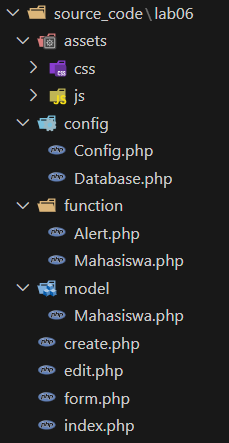
1. Buat folder baru didalam folder htdocs, kemudian buka menggunakan VS Code dan buat struktur file atau direktori seperti gambar berikut ini.
2. Koneksi ke database
a. Pertama-tama buat database baru dengan nama pemrograman_web, kemudian buat table mahasiswa sebagai berikut.
CREATE TABLE mahasiswa (id int(11) NOT NULL,nim varchar(16) NOT NULL,nama varchar(128) NOT NULL,jurusan varchar(128) NOT NULL
) ENGINE=InnoDB DEFAULT CHARSET=utf8mb4 COLLATE=utf8mb4_general_ci;
b. Selanjutnya membuat koneksi ke database, buka file config/Database.php dan ketikan kode program Berkut ini.
<?php
class Database {
    private $host = "localhost";
    private $db_name = "pemrograman_web";
    private $username = "root";
    private $password = "";
    public $conn;

    public function getConnection() {
        $this->conn = null;
        try {
            $this->conn = new mysqli($this->host, $this->username, $this->password, $this->db_name);
        } catch (Exception $e) {
            echo "Connection error: " . $e->getMessage();
        }
        return $this->conn;
    }
}
?>
c. File Config.php
File Config.php digunakan untuk membuat variable constant yang mana nantinya dapat diakases dari kelas manapun, pada praktikum ini akan membuat variable constant dengan nama BASE_URL yang berisi string base url dari project yang akan dibuat.
D. Alert.php
Alert.php digunakan untuk membuat sebuah function yang berfungsi untuk menampilkan pesan Ketika melakukan operasi terhadap data, fungsi ini memiliki 2 buah argument statement yaitu $msg yang berisi pesan dan $sts yang berisi kode jika status 1 maka pesan berhasil dan jika 0 maka pesan gagal. Berikut kode program fungsi alert.
<?php
function alert($msg, $sts) {
    if($sts == 1) {
        $tipe = 'success';
    } else {
        $tipe = 'danger';
    }

    echo '
        <div class="alert alert-'.$tipe.'" role="alert">'.$msg.'
        </div>
    ';
}
E. Model Mahasiswa
Class Mahasiswa digunakan untuk membuat fungsi operasi Create, Read, Update dan Delete data Mahasiswa, berikut ini Langkah-langkah pembuatan class Mahasiswa.
1. Tambahkan session_start() pada baris paling atas kode program
2. Buat class dengan nama Mahasiswa
3. Deklarasikan variabel yang dibutuhkan dan fungsi constructor yang memanggil koneksi database
<?php
session_start();
class Mahasiswa {
private $conn;
private $table_name = “mahasiswa”;
public $id;
public $nim;
public $nama;
public $jurusan;
public function __construct($db) {
$this->conn = $db;
}
4. Buat fungsi create yang nantinya digunakan untuk menambahkan data mahasiswa
    public function create() {
        $query = "INSERT INTO " . $this->table_name . " SET nim=?, nama=?, jurusan=?";
        $stmt = $this->conn->prepare($query);
        $stmt->bind_param("sss", $this->nim, $this->nama, $this->jurusan);
        if ($stmt->execute()) {
            $_SESSION['flash_message'] = "Data berhasil disimpan!";
            header("Location: " . BASE_URL . "index.php?msg=1");
        } else {
            $_SESSION['flash_message'] = "Data gagal disimpan!";
            header("Location: " . BASE_URL . "index.php?msg=0");
        }
    }
5. Buat fungsi read untuk menampilkan data mahasiswa, fungsi read memiliki default parameter $id yang berisi string kosong, jika $id == “” maka akan mengeksekusi query untuk menampilkan seluruh data mahasiswa, jika $id !== “” maka akan mengeksekusi query untuk menampilkan data mahasiswa berdasarkan id mahasiswa. Berikut kode program fungsi read.
  public function read($id="") {
        if ($id == "") {
            $query = "SELECT * FROM " . $this->table_name;
        } else {
            $query = "SELECT * FROM " . $this->table_name . " WHERE id= " . $id;
        }
        $result = $this->conn->query($query);
        return $result;
    }
6. Buat fungsi update untuk melakukan perubahan data mahasiswa berdasarkan ID mahasiswa
 public function update() {
        $query = "UPDATE " . $this->table_name . " SET nim=?, nama=?, jurusan=? WHERE id=?";
        $stmt = $this->conn->prepare($query);
        $stmt->bind_param("ssss", $this->nim, $this->nama, $this->jurusan, $this->id);
        if ($stmt->execute()) {
            $_SESSION['flash_message'] = "Data berhasil diupdate!";
            header("Location: " . BASE_URL . "index.php?msg=1");
        } else {
            $_SESSION['flash_message'] = "Data gagal diupdate!";
            header("Location: " . BASE_URL . "index.php?msg=0");
        }
    }
7. Buat fungsi delete untuk menghapus data mahasiswa berdasarkan ID
    public function delete() {
        $query = "DELETE FROM " . $this->table_name . " WHERE id=?";
        $stmt = $this->conn->prepare($query);
        $stmt->bind_param("s", $this->id);
        if ($stmt->execute()) {
            $_SESSION['flash_message'] = "Data berhasil dihapus!";
            header("Location: " . BASE_URL . "index.php?msg=1");
        } else {
            $_SESSION['flash_message'] = "Data gagal disimpan!";
            header("Location: " . BASE_URL . "index.php?msg=0");
        }
    }
}
?>