LATIHAN
Buatlah tampilan widget secara vertical dan horizontal dengan menggunakan minimal 3 buah basic widget dalam 1 tampilan. > Berikut kode tampilan widget vertikal dan horizontal (min 3 elemen tiap tampilan)
import 'package:flutter/material.dart';

void main() {
  runApp(const MyProfileApp());
}

class MyProfileApp extends StatelessWidget {
  const MyProfileApp({super.key});

  @override
  Widget build(BuildContext context) {
    return MaterialApp(
      home: Scaffold(
        appBar: AppBar(
          title: const Text("Profile Saya"),
          backgroundColor: Colors.blueAccent,
        ),
        body: Padding(
          padding: const EdgeInsets.all(20),
          child: Column(
            crossAxisAlignment: CrossAxisAlignment.start,
            children: [
              Row(
                children: [
                  Container(
                    width: 100,
                    height: 100,
                    decoration: BoxDecoration(
                      shape: BoxShape.circle,
                      image: const DecorationImage(
                        image: AssetImage(
                          "assets/images/devia.jpg",
                        ),
                        fit: BoxFit.cover,
                      ),
                      border: Border.all(color: Colors.blueAccent, width: 3),
                    ),
                  ),

                  const SizedBox(width: 20),

                  Column(
                    crossAxisAlignment: CrossAxisAlignment.start,
                    children: const [
                      Text(
                        "Devia Puji Astuti",
                        style: TextStyle(
                          fontSize: 18,
                          fontWeight: FontWeight.bold,
                        ),
                      ),
                      Text("NIM: 1234567890"),
                    ],
                  ),
                ],
              ),

              const SizedBox(height: 20),

              const Text(
                "Informasi Lengkap",
                style: TextStyle(fontSize: 16, fontWeight: FontWeight.bold),
              ),
              const SizedBox(height: 10),

              Row(
                children: const [
                  Icon(Icons.home, color: Colors.blue),
                  SizedBox(width: 10),
                  Expanded(
                    child: Text("Jl. Merpati No. 123, Padang, Sumbar"),
                  ),
                ],
              ),

              const SizedBox(height: 10),

              Row(
                children: const [
                  Icon(Icons.phone, color: Colors.green),
                  SizedBox(width: 10),
                  Text("0812-3456-7890"),
                ],
              ),

              const SizedBox(height: 10),

              Row(
                children: const [
                  Icon(Icons.school, color: Colors.red),
                  SizedBox(width: 10),
                  Text("Informatika"),
                ],
              ),
            ],
          ),
        ),
      ),
    );
  }
}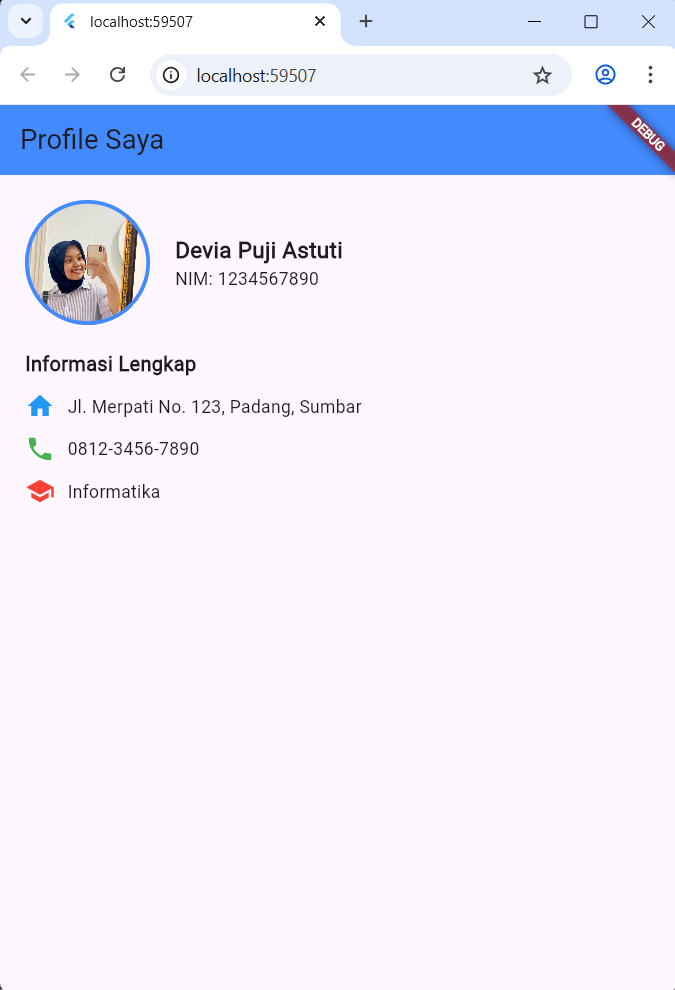
di sini saya menggunakan image yang secara langsung saya ambil dari “assetimage” yang berbentuk circle. selanjutnya untuk informasi lengkap saya menggunakan icon, berupa icon home, phone dan scholl. nah untuk melengkapi apa apa saja didalamnya dengan nama, nim dan keterangan lainnya saya menggunakan teks untuk sebagai keterangannya.